> For the complete documentation index, see [llms.txt](https://manual.egclinea.com/llms.txt). Markdown versions of documentation pages are available by appending `.md` to page URLs; this page is available as [Markdown](https://manual.egclinea.com/systemmanager/recept/opdater-vaccinationsstatistik.md).
# Opdater vaccinationsstatistik
### Baggrunden for funktionen
I forbindelse med vaccinationsindsatsen mod COVID-19 er der trådt en midlertidig bekendtgørelse i kraft, som giver praktiserende læger adgang til at indhente vaccinationsoplysninger i Det Danske Vaccinationsregister (DDV). Adgangen gør det muligt for lægen at opsøge relevante patienter i sin patientpopulation, når det er nødvendigt med henblik på at kunne tilbyde vaccination mod COVID-19.
Den nye adgang til opsøgende tilbud om vaccination er defineret i § 5, stk. 2, i [Bekendtgørelse om behandling af personoplysninger i forbindelse med tilbud om vaccination mod COVID-19 (retsinformation.dk)](https://www.retsinformation.dk/eli/lta/2021/2468).
Med den nye § 5, stk. 2, i bekendtgørelsen er det nu muligt at foretage masseopslag og udtræk fra DDV, hvormed der kan fremsøges COVID-19-vaccinationsstatus på klinikkens patientpopulation.
Bekendtgørelsen løber til udgangen af marts 2022.
### Information inden brug af funktionen
* Det vil kun være brugere af typen *Læge*, der har adgang til funktionen **Opdater vaccinationsstatistik**, og funktionen kræver ydermere login med digital signatur.
* Når vaccinationsstatistikken opdateres, vil dette omfatte alle klinikkens aktive patienter, der har klinikken registreret i feltet *Egen læge* på Patienthovedet, og som er 5 år eller ældre.
**Vær opmærksom på**, at opdateringen af vaccinationsstatistikken kan tage lang tid, alt efter klinikkens størrelse. I nogle tilfælde kan der givetvis gå op mod 60 minutter, før opdateringen er gennemført.
Da opdateringen foretages via Systemmanager, vil det være muligt at klikke på EG Clinea-ikonet i proceslinjen og dermed kalde EG Clinea op foran Systemmanager. Det er dermed muligt at arbejde videre, mens opdateringen kører i baggrunden.
### Brugen af Opdater vaccinationsstatistik
1. Åbn funktionen via **Systemmanager** → **Medicin** → **Opdater vaccinationsstatistik**.
2. Bekræft, at der skal hentes vaccinationsdata for det aktuelle ydernummer.
3. EG Clinea foretager nu et masseopslag i DDV på alle klinikkens egne patienter og opdaterer disse patienters vaccinationskort, så de indeholder fuldt opdaterede oplysninger om de pågældende patienters vaccinationer, herunder også COVID-19-vaccinationer.
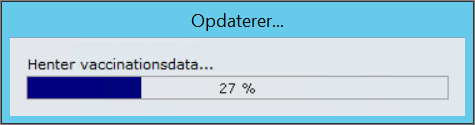
4. Når hentning af vaccinationsdata pågår, kan en status på hentningen følges på skærmen.
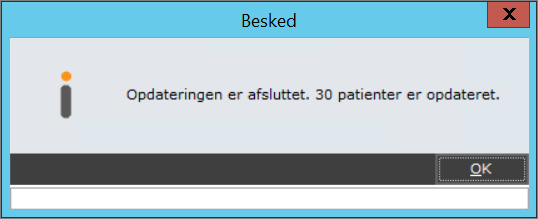
5. Når vaccinationsdata er blevet opdateret, vises en oversigt over antallet af patienter, der har fået opdateret vaccinationskortet i EG Clinea.
6. Afslut funktionen ved at klikke på **OK**.
### Udtræk af vaccinationsstatus
Klinikkens patienters COVID-19-vaccinationsstatus kan nu udtrækkes via EG Clineas statistikmodul.
En trinvis vejledning til opbygning af en COVID-19-statistikskabelon samt afvikling af denne kan findes øverst på siden **Statistik** → **Opret ny skabelon** → [Trinvise eksempler](/statistik/opret_ny_skabelon/trinvis-eksempler_opret-ny-skabelon.md).
---
# Agent Instructions
This documentation is published with GitBook. GitBook is the documentation platform designed so that both humans and AI agents can read, navigate, and reason over technical content effectively. Learn more at gitbook.com.
## Querying This Documentation
If you need additional information that is not directly available in this page, you can query the documentation by asking a question.
Perform an HTTP GET request on the following URL with the `ask` and `goal` query parameters:
```
GET https://manual.egclinea.com/systemmanager/recept/opdater-vaccinationsstatistik.md?ask=&goal=
```
`ask` is the immediate question: it should be specific, self-contained, and written in natural language.
`goal` is what the user is ultimately trying to achieve, the reason they need the answer. Sharing it helps GitBook give you a better, more relevant answer. A goal is most helpful when it describes the outcome the user wants rather than restating the question. For example, with `ask=how do I create an API token`, a goal like `automate deployments from our CI pipeline` lets GitBook tailor the answer to that use case.
The response will contain a direct answer to the question and relevant excerpts and sources from the documentation.
Use this mechanism when the answer is not explicitly present in the current page, you need clarification or additional context, or you want to retrieve related documentation sections.