> For the complete documentation index, see [llms.txt](https://manual.egclinea.com/llms.txt). Markdown versions of documentation pages are available by appending `.md` to page URLs; this page is available as [Markdown](https://manual.egclinea.com/medicin_fmk/faelles-medicin-beslutningssto/pt-uden-medkort-beslutningsst_.md).
# Patienter uden medicinkort - Fælles Medicin Beslutningsstøtte
For patienter uden medicinkort på FMK, det vil sige patienter der ikke har ordinationer, men kun recepter registreret på medicinkortet (for eksempel udlændinge), vises advarsler vedrørende beslutningsstøtte på recepterne.
{% hint style="info" %}
**Bemærk!** Der udregnes kun beslutningsstøtte på recepter, hvor hverken udløbs- eller opbrugtdato er passeret.
{% endhint %}
På oversigten over patientens recepter findes kolonnen *Beslutningsstøtte*.
**Bemærk!** Kolonnen er fast og kan ikke fravælges.

### Vis detaljer for beslutningsstøtte på en enkelt recept
Højreklik på en recept, og vælg menupunktet **Vis beslutningsstøtte for recepten**. Vinduet *Fælles Medicin Beslutningsstøtte - \[Præparatets navn, styrke og form]* åbnes.
I venstre side af vinduet vises beslutningsstøtteresultaterne for det valgte præparat i følgende prioriterede rækkefølge:
* Kontraindikationer (rødt udråbstegn)
* Forsigtighed (gult udråbstegn)
* Fejl/mangler (**rødt “x”-ikon** / **“i”-ikon**)
Markeres et af resultaterne, vises der i højre side af vinduet uddybende detaljer samt kildedata, som danner grundlag for det valgte beslutningsstøtteresultat.
Klik på **Vis alt** for at vise alle fejl/mangler vedrørende alle recepter på patienten.
 ### Vis detaljer for beslutningsstøtte på medicinkortet
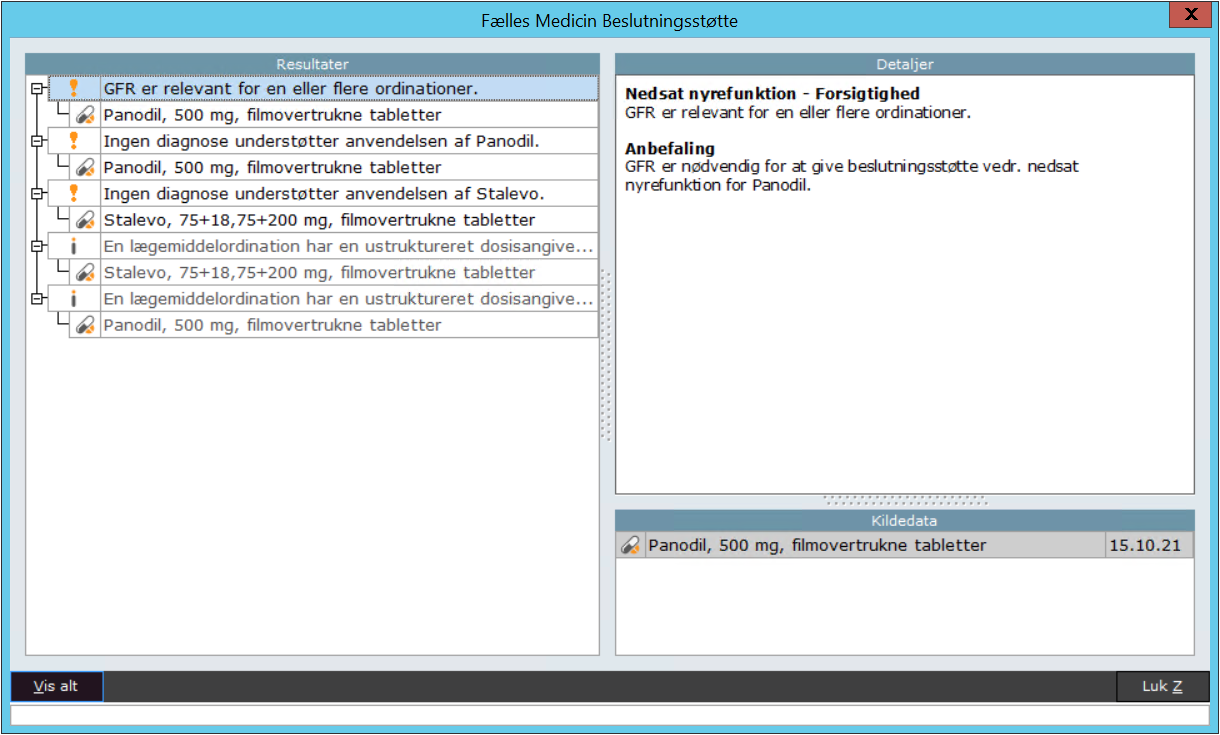
Højreklik på medicinkortet, og vælg menupunktet **Vis beslutningsstøtte for medicinkortet**. Vinduet *Fælles Medicin Beslutningsstøtte* åbnes.
I venstre side af vinduet vises alle beslutningsstøtteresultater for alle recepter på patientens medicinkort, i følgende prioriterede rækkefølge:
* Kontraindikationer (rødt udråbstegn)
* Forsigtighed (gult udråbstegn)
{% hint style="info" %}
**Bemærk!** Fejl/mangler vises som udgangspunkt ikke ved valg af menupunktet *Vis beslutningsstøtte for medicinkortet*.
{% endhint %}
Markeres et af resultaterne, vises der i højre side af vinduet uddybende detaljer samt kildedata, som danner grundlag for det valgte beslutningsstøtteresultat.
Klik på **Vis alt** for at vise fejl/mangler nederst i listen over beslutningsstøtteresultater. Fejl vises med et rødt “x”-ikon, og mangler vises med et “i”-ikon.
 ---
# Agent Instructions
This documentation is published with GitBook. GitBook is the documentation platform designed so that both humans and AI agents can read, navigate, and reason over technical content effectively. Learn more at gitbook.com.
## Querying This Documentation
If you need additional information that is not directly available in this page, you can query the documentation by asking a question.
Perform an HTTP GET request on the following URL with the `ask` and `goal` query parameters:
```
GET https://manual.egclinea.com/medicin_fmk/faelles-medicin-beslutningssto/pt-uden-medkort-beslutningsst_.md?ask=&goal=
```
`ask` is the immediate question: it should be specific, self-contained, and written in natural language.
`goal` is what the user is ultimately trying to achieve, the reason they need the answer. Sharing it helps GitBook give you a better, more relevant answer. A goal is most helpful when it describes the outcome the user wants rather than restating the question. For example, with `ask=how do I create an API token`, a goal like `automate deployments from our CI pipeline` lets GitBook tailor the answer to that use case.
The response will contain a direct answer to the question and relevant excerpts and sources from the documentation.
Use this mechanism when the answer is not explicitly present in the current page, you need clarification or additional context, or you want to retrieve related documentation sections.