> For the complete documentation index, see [llms.txt](https://manual.egclinea.com/llms.txt). Markdown versions of documentation pages are available by appending `.md` to page URLs; this page is available as [Markdown](https://manual.egclinea.com/links.md).
# Links
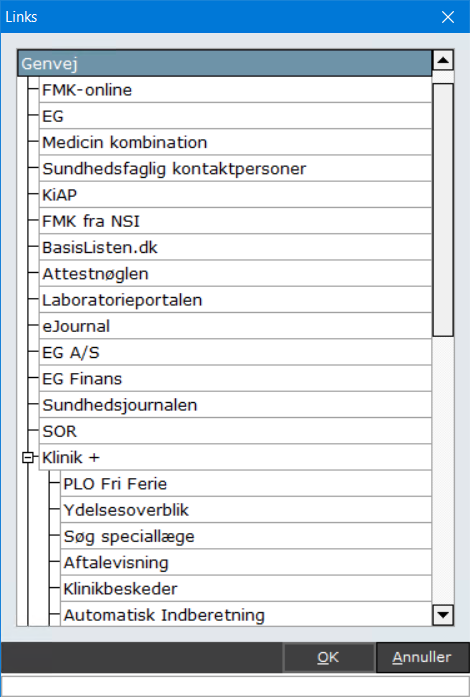
EG Clinea har både egen- og systemoprettede links.
 #### Funktioner
* Åbn skærmbilledet med Links ved at vælge *Menu* > *Links*, eller tryk Ctrl+Alt+K.
* Åbn et link i en browser ved at markere en linje og klikke **OK** (alternativt dobbeltklik, eller tryk Enter). Linket åbner i en browser, samtidig med at *Links* lukkes.
* Opret links i [Systemmanager](/systemmanager/lister/links-opsaetning.md), hvorfra det også er muligt at ændre listens rækkefølge eller deaktivere systemoprettede links.
#### Beskrivelse af diverse links
I kategorien **Klinik +** er alle 1Login-links fra PLSP placeret. Det er ikke muligt at flytte links ind i eller ud af kategorien. 1Login-links, der kræver autorisations-ID, vises kun for brugere med autorisations-ID.
**Sundhedsjournalen**\
Laver et opslag til patientens Sundhedsjournal fra EG Clinea. Opslaget forudsætter altid patientens samtykke og bliver registreret som sådan. Det forudsætter desuden, at patienten er slået op på Patienthovedet, for at linket åbner patientens Sundhedsjournal.
**eJournal**\
Giver praktiserende læge eller speciallæge adgang til patientens elektroniske patientjournal på tværs af sygehuse og regioner. Her kan du finde oplysninger om behandlingsforløb, diagnoser, notater samt epikriser.
**Liva Healthcare**\
Forudsætter, at en patient er slået op i Patienthovedet med fuldt CPR-nummer. Kræver desuden opsætning i [Systemmanager](/systemmanager/system/klinik.md) med klinikkens brugernavn og adgangskode til Liva Healthcare.
**Video venteværelse**\
Logger brugeren automatisk ind med egen klinik og brugeroplysninger, hvorefter det virtuelle venteværelse og videokonsultationen kan tilgås.
{% hint style="info" %}
**Bemærk!** Brugere med brugertypen sekretær kan ikke tilgå linket. Linket forsøger automatisk at åbne i Google Chrome.
{% endhint %}
**Aftalevisning**\
En service lanceret af PLSP. Aftalevisning giver digital adgang til at se patientens fremtidige aftaler i sundhedsvæsenet, herunder hos hospitaler, hjemmesygeplejersker og andre, der er involveret i patientens behandling. Adgang til Aftalevisning kræver login med digital signatur. Læs mere om Aftalevisning på [PLSP's hjemmeside](https://www.plsp.dk/projekter/aftalevisning).
---
# Agent Instructions
This documentation is published with GitBook. GitBook is the documentation platform designed so that both humans and AI agents can read, navigate, and reason over technical content effectively. Learn more at gitbook.com.
## Querying This Documentation
If you need additional information that is not directly available in this page, you can query the documentation by asking a question.
Perform an HTTP GET request on the following URL with the `ask` and `goal` query parameters:
```
GET https://manual.egclinea.com/links.md?ask=&goal=
```
`ask` is the immediate question: it should be specific, self-contained, and written in natural language.
`goal` is what the user is ultimately trying to achieve, the reason they need the answer. Sharing it helps GitBook give you a better, more relevant answer. A goal is most helpful when it describes the outcome the user wants rather than restating the question. For example, with `ask=how do I create an API token`, a goal like `automate deployments from our CI pipeline` lets GitBook tailor the answer to that use case.
The response will contain a direct answer to the question and relevant excerpts and sources from the documentation.
Use this mechanism when the answer is not explicitly present in the current page, you need clarification or additional context, or you want to retrieve related documentation sections.