> For the complete documentation index, see [llms.txt](https://manual.egclinea.com/llms.txt). Markdown versions of documentation pages are available by appending `.md` to page URLs; this page is available as [Markdown](https://manual.egclinea.com/kalender/rediger_forny_kopier-en-tid.md).
# Rediger/Forny/Kopier tid
### Rediger en tid
Tryk F2 for at redigere den aktuelle tid. Samtlige felter på tiden kan redigeres.
### Forny en tid
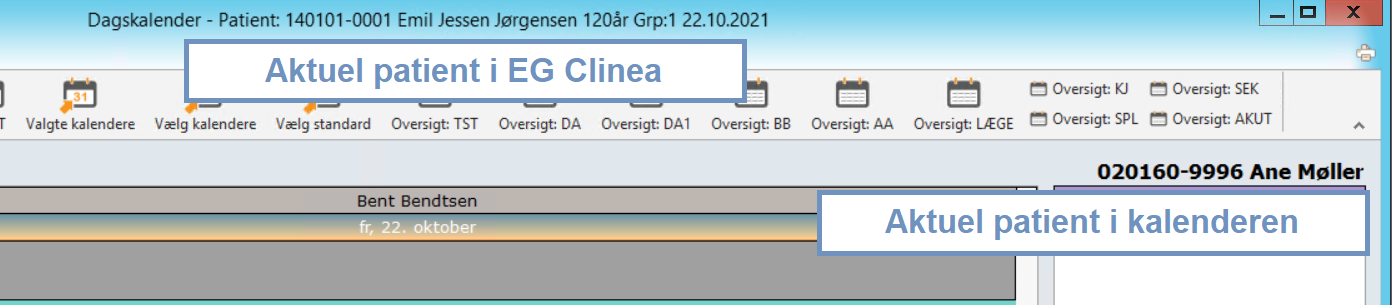
Tryk F9 for at forny en tid. Patientens CPR-nummer fremkommer i øverste højre hjørne, og tiden indsættes igen med Ins.
{% hint style="info" %}
**Bemærk!**
* Noten kopieres ikke med.
* Når funktionen *Forny* bruges, er patienten kun aktiv i kalenderen. Når kalenderen forlades, skal det derfor sikres, at den patient, du ønsker at arbejde videre med, er den korrekt aktiverede patient i EG Clinea. Dette kan ses i bjælken allerøverst i EG Clinea.
{% endhint %}
 ### Kopier en tid
Tryk Ctrl+C for at kopiere en tid, og Ctrl+V for at sætte den ind igen.
{% hint style="info" %}
**Bemærk!** Noten kopieres med ved brug af Ctrl+C og Ctrl+V. Det gælder for tider både med og uden patienter.
{% endhint %}
---
# Agent Instructions
This documentation is published with GitBook. GitBook is the documentation platform designed so that both humans and AI agents can read, navigate, and reason over technical content effectively. Learn more at gitbook.com.
## Querying This Documentation
If you need additional information that is not directly available in this page, you can query the documentation by asking a question.
Perform an HTTP GET request on the following URL with the `ask` and `goal` query parameters:
```
GET https://manual.egclinea.com/kalender/rediger_forny_kopier-en-tid.md?ask=&goal=
```
`ask` is the immediate question: it should be specific, self-contained, and written in natural language.
`goal` is what the user is ultimately trying to achieve, the reason they need the answer. Sharing it helps GitBook give you a better, more relevant answer. A goal is most helpful when it describes the outcome the user wants rather than restating the question. For example, with `ask=how do I create an API token`, a goal like `automate deployments from our CI pipeline` lets GitBook tailor the answer to that use case.
The response will contain a direct answer to the question and relevant excerpts and sources from the documentation.
Use this mechanism when the answer is not explicitly present in the current page, you need clarification or additional context, or you want to retrieve related documentation sections.