> For the complete documentation index, see [llms.txt](https://manual.egclinea.com/llms.txt). Markdown versions of documentation pages are available by appending `.md` to page URLs; this page is available as [Markdown](https://manual.egclinea.com/fraser/opret-frase.md).
# Opret frase
Gældende for både **systemfraser** og **systemfelter** er, at de henter data allerede registreret på patienten.
### Opret ny frase (Ins)
Tryk Ins i feltet *Fraseindhold* for at se en liste over systemfraser og systemfelter. Med systemfelter kan du trække enkelte felter fra EG Clinea ud og bruge dem i en frase.

### Systemfelt: Videresendt tekst
I eksemplet nedenfor er systemfeltet **Videresendt tekst** brugt.
Dette systemfelt kan kun bruges i frasen "Svar til patient", da feltet automatisk erstattes af teksten fra den besked, der besvares.
 ### Systemfelt: Seneste prøveværdi
Systemfeltet **Seneste prøveværdi** gør det muligt at indsætte den seneste prøveværdi af en specifik laboratoriekode i en tekst.
1. Indsæt *Seneste prøveværdi*. En oversigt over samtlige laboratorieprøver åbnes.
2. Find og vælg den ønskede laboratoriekode. Teksten "*Seneste:\[NPU-kode]*" indsættes nu i frasen.
Du kan bruge systemfeltet flere gange i samme frase.
Bruges frasen, indsættes automatisk den seneste prøveværdi fra modulet *Laboratorietal* for den valgte laboratorieprøve. **Bemærk**, at kun værdien indsættes, ikke navnet på laboratorieprøven.
Findes der ikke en værdi for den valgte laboratorieprøve, vises der blot et blankt felt.
#### Eksempel
I eksemplet nedenfor er systemfeltet *Seneste prøveværdi* indsat flere gange, med flere forskellige laboratorieprøver, og der bruges [minus-frase](/fraser.md).
**Opsætning af frasen:**
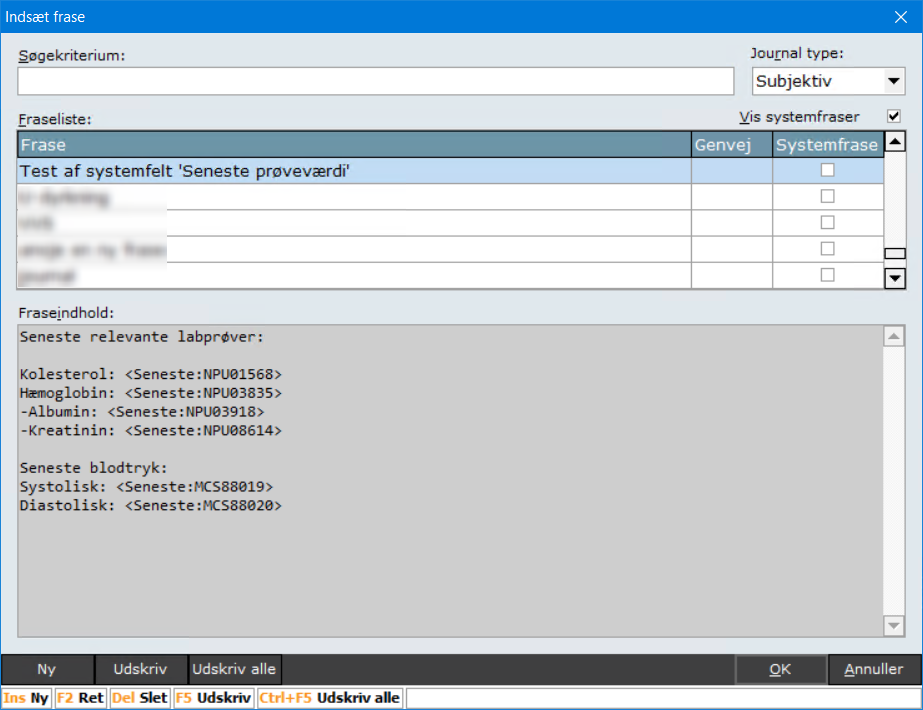 **Resultat ved brug af frasen:** (Kreatinin er automatisk fjernet, da der ikke fandtes en værdi at indsætte.)

---
# Agent Instructions
This documentation is published with GitBook. GitBook is the documentation platform designed so that both humans and AI agents can read, navigate, and reason over technical content effectively. Learn more at gitbook.com.
## Querying This Documentation
If you need additional information that is not directly available in this page, you can query the documentation by asking a question.
Perform an HTTP GET request on the following URL with the `ask` and `goal` query parameters:
```
GET https://manual.egclinea.com/fraser/opret-frase.md?ask=&goal=
```
`ask` is the immediate question: it should be specific, self-contained, and written in natural language.
`goal` is what the user is ultimately trying to achieve, the reason they need the answer. Sharing it helps GitBook give you a better, more relevant answer. A goal is most helpful when it describes the outcome the user wants rather than restating the question. For example, with `ask=how do I create an API token`, a goal like `automate deployments from our CI pipeline` lets GitBook tailor the answer to that use case.
The response will contain a direct answer to the question and relevant excerpts and sources from the documentation.
Use this mechanism when the answer is not explicitly present in the current page, you need clarification or additional context, or you want to retrieve related documentation sections.