> For the complete documentation index, see [llms.txt](https://manual.egclinea.com/llms.txt). Markdown versions of documentation pages are available by appending `.md` to page URLs; this page is available as [Markdown](https://manual.egclinea.com/eksporter_patient/udskriv_patient.md).
# Udskriv patient
 ## Funktioner og felter
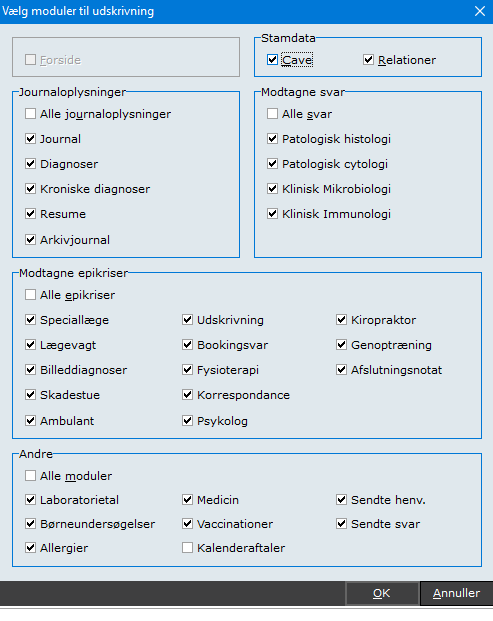
**Udskriv patient** udskriver udvalgte patientoplysninger. Funktionen findes under modulet **Andre** øverst i EG Clinea.
### Moduler til udskrivning
Udskriften er opdelt i:
* Stamdata
* Journaloplysninger
* Modtagne svar
* Modtagne epikriser
* Andre
Alle punkter er markeret som standard. Fravælg de punkter, du ikke vil have med.
#### Kalenderaftaler
Tilvælges *Kalenderaftaler*, vises både tidligere og fremtidige aftaler på udskriften.
En kalenderaftale vises med dato, tidspunkt, kalendernavn og eventuel note. Derudover fremgår det, hvilken bruger der har oprettet aftalen, og hvornår, samt om aftalen er ændret, flyttet, aflyst eller markeret som ankommet.
#### Relationer
Boksen *Relationer* giver mulighed for at fravælge visning af patientens relationer i udskriften. Den er ikke markeret som standard.
Medtages relationer, vises de i et overskueligt 3-linjet format med:
1. Relationstype
2. CPR-nummer
3. Navn
#### Fra og til dato
*Fra* og *til dato* er sat til dags dato som standard. Ret datoerne ved at trykke **Ins** i felterne.
Det giver øget fleksibilitet ved udskrivning, især i situationer, hvor relationer ikke bør fremgå.
#### Generer udskriften
1. Klik **OK** for at sende udskriften til printeren.
2. Vil du afbryde undervejs, klik **Nej**, når du bliver spurgt, om udskrivningen skal fortsætte.
EG Clinea giver besked, når eksporten/udskriften er færdig.
{% hint style="info" %}
**Bemærk!** Muligheden for at tilpasse *Vælg moduler til udskrivning* er implementeret i [version 20.2](https://manual.egclinea.com/eksporter_patient/pages/747hDn5eXoZrohPZ3EHN#eg-clinea-20.2).
{% endhint %}
## Notat i Journal
EG Clinea genererer automatisk en kontakt i journalen vedr. dette:

---
# Agent Instructions
This documentation is published with GitBook. GitBook is the documentation platform designed so that both humans and AI agents can read, navigate, and reason over technical content effectively. Learn more at gitbook.com.
## Querying This Documentation
If you need additional information that is not directly available in this page, you can query the documentation by asking a question.
Perform an HTTP GET request on the following URL with the `ask` and `goal` query parameters:
```
GET https://manual.egclinea.com/eksporter_patient/udskriv_patient.md?ask=&goal=
```
`ask` is the immediate question: it should be specific, self-contained, and written in natural language.
`goal` is what the user is ultimately trying to achieve, the reason they need the answer. Sharing it helps GitBook give you a better, more relevant answer. A goal is most helpful when it describes the outcome the user wants rather than restating the question. For example, with `ask=how do I create an API token`, a goal like `automate deployments from our CI pipeline` lets GitBook tailor the answer to that use case.
The response will contain a direct answer to the question and relevant excerpts and sources from the documentation.
Use this mechanism when the answer is not explicitly present in the current page, you need clarification or additional context, or you want to retrieve related documentation sections.